What is Cloud Architecture? A Complete Guide to Designing Scalable Cloud Systems
Cloud computing has changed the way organizations build and operate software. Instead of purchasing and maintaining physical servers, businesses can use cloud platforms to provision computing resources, databases, networking, storage, security services, and other infrastructure on demand.
But simply moving an application to the cloud does not automatically make it scalable, secure, reliable, or cost-efficient.
This is where cloud architecture comes in.

Cloud architecture defines how an application's components are organized in the cloud, how they communicate with each other, how users access the application, how data is stored, and how the system handles security, failures, traffic spikes, and operational requirements.
Today, we'll explore what cloud architecture is, its major components, common architectural patterns, design principles, benefits, challenges, and a practical example of a modern cloud application.
What Is Cloud Architecture?
Cloud architecture is the design and organization of computing resources, applications, data, networking, security, and services that work together to deliver an application or workload in a cloud environment.
A cloud architecture typically defines:
How users access an application
Where application workloads run
How services communicate
Where data is stored
How traffic is distributed
How systems are secured
How failures are handled
How infrastructure scales
How applications are monitored
How cloud costs are controlled
Think of cloud architecture as the blueprint of a cloud-based system.
A building needs a blueprint that defines its structure, electrical systems, plumbing, entrances, and safety mechanisms. Similarly, a cloud application needs an architecture that defines its compute, networking, storage, security, data, and operational components.
Cloud Architecture vs. Cloud Infrastructure
These terms are related but aren't exactly the same.
Cloud infrastructure refers to the underlying resources used to run workloads, such as:
Virtual machines
Containers
Networks
Load balancers
Storage
Databases
Firewalls
DNS
Identity services
Cloud architecture describes how these resources are selected, organized, connected, and operated to meet application requirements.
For example, having virtual machines, a database, and a load balancer is infrastructure.
Deciding to place the application behind a load balancer, deploy multiple application instances across availability zones, use a managed database, isolate resources in private subnets, and implement centralized monitoring is an architectural decision.
Why Is Cloud Architecture Important?
A well-designed architecture helps organizations build systems that can respond to changing requirements.
A poorly designed architecture can create problems such as:
Application downtime
Security vulnerabilities
Poor performance
Difficult deployments
Unexpected cloud costs
Data loss
Scaling problems
Operational complexity
Consider an e-commerce application.
During normal hours, it may receive 1,000 requests per minute. During a major sale, traffic could increase dramatically.
A traditional fixed-capacity architecture might struggle with this sudden increase.
A cloud-native architecture can be designed to automatically add application capacity as demand increases and reduce capacity when demand falls.
That ability is one of the major advantages of designing applications for cloud environments.
Major Components of Cloud Architecture
Cloud architectures vary depending on the application, but most systems contain several common building blocks.
Clients and Users
DNS
Load Balancer
Compute
Virtual Machines
Containers
Serverless Functions
Networking
Databases
Object Storage
Caching
Messaging and Event Systems
Identity and Access Management
Monitoring and Logging
Clients and Users
The architecture begins with the users or systems accessing the application.
Clients can include:
Web browsers
Mobile applications
Desktop applications
IoT devices
Internal applications
External APIs
The client communicates with the application's entry point through a network connection, typically using HTTPS.
DNS
The Domain Name System (DNS) translates human-readable domain names into network addresses.
For example:

Cloud providers commonly offer managed DNS services that can integrate with load balancers, routing policies, health checks, and other cloud components.
Load Balancer
A load balancer distributes incoming traffic across multiple application instances.
For example:

Instead of sending every request to a single server, the load balancer distributes traffic across available instances.
This can improve:
Availability
Scalability
Performance
Fault tolerance
Many cloud platforms provide managed load-balancing services.
Compute
Compute resources execute application code.
Common approaches include:
Virtual Machines
Virtual machines provide a traditional server-based model.
They are useful when applications require operating-system-level control or have specific infrastructure requirements.
Containers
Containers package an application and its dependencies into a portable unit.
They are commonly used with platforms such as Kubernetes and managed container services.
Serverless Functions
Serverless computing allows developers to run code without directly managing servers.
Functions are typically invoked in response to events or requests.
The appropriate compute model depends on the application's requirements.
Networking
Networking connects the different components of a cloud architecture.
A typical architecture may contain:
Virtual networks
Subnets
Routing tables
Internet gateways
NAT gateways
Firewalls
Security groups
Private endpoints
A common security pattern is to keep databases and internal services away from direct public internet access.
For example:

This separation reduces the attack surface and allows network access to be controlled more precisely.
Databases
Applications need persistent storage for information such as:
User accounts
Orders
Products
Transactions
Configuration
Application state
Cloud platforms provide many database options, including:
Relational databases
NoSQL databases
Key-value databases
Document databases
Graph databases
Data warehouses
The database should be selected based on application requirements rather than simply choosing the most popular technology.
Object Storage
Object storage is commonly used for files and unstructured data.
Examples include:
Images
Videos
Documents
Backups
Logs
Data exports
Static website assets
Object storage is particularly useful because it can scale independently from application compute resources.
Caching
Caching stores frequently accessed information closer to the application or user.
Instead of querying the database for every request, frequently requested information can be served from a cache.
Caching can reduce database load and improve response times.
Messaging and Event Systems
Modern applications often use asynchronous communication.
Instead of one service directly waiting for another service to complete a task, it can publish an event or message.
For example:
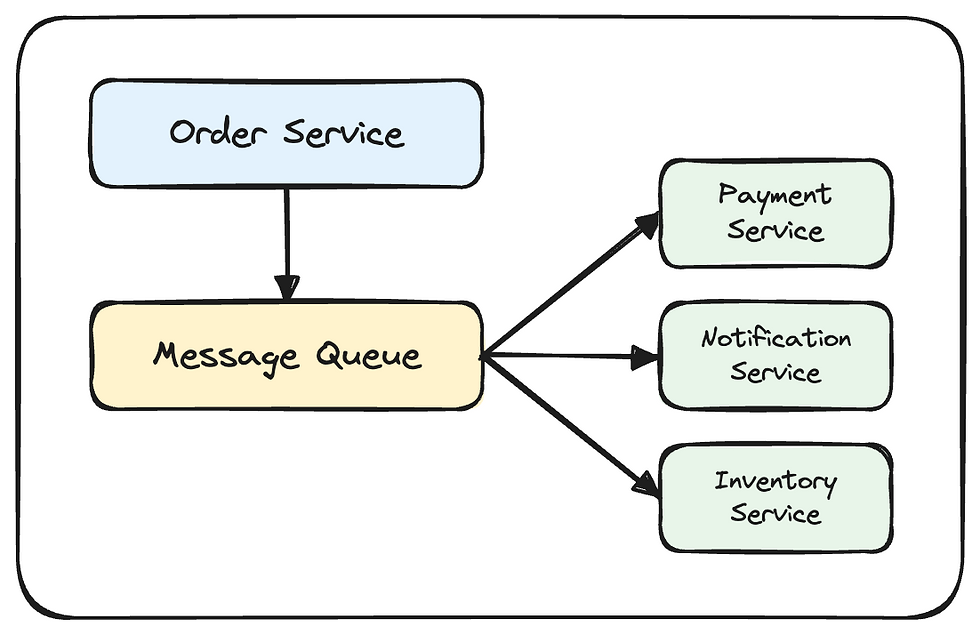
This approach can improve scalability and reduce dependencies between services.
Identity and Access Management
Security is a fundamental part of cloud architecture.
Identity and Access Management (IAM) controls:
Who can access resources
What resources they can access
What actions they can perform
A strong architecture follows the principle of least privilege.
Users and services should receive only the permissions they actually require.
For example, an application that only needs to read objects from a storage bucket should not receive permission to delete every object in the account.
Monitoring and Logging
Cloud applications need visibility into their behavior.
Monitoring systems can track:
CPU utilization
Memory usage
Request rates
Response times
Error rates
Database performance
Network traffic
Application health
Logging provides detailed information about events occurring inside the system.
Together, monitoring, logging, and alerting help teams detect and troubleshoot problems.
Common Cloud Architecture Patterns
There is no single architecture that works for every application.
Several patterns are commonly used:
Monolithic Architecture
Microservices Architecture
Serverless Architecture
Event-Driven Architecture
Monolithic Architecture
In a monolithic architecture, most application functionality is deployed as a single application.

Advantages
Simple to develop initially
Easier deployment
Straightforward local development
Fewer distributed-system problems
Challenges
Scaling individual components can be difficult
Large codebases can become harder to maintain
A failure can potentially affect the entire application
Independent deployments are more difficult
Monolithic architecture isn't inherently bad. For many applications, a well-designed monolith can be simpler and more cost-effective than a distributed architecture.
Microservices Architecture
Microservices divide an application into smaller independently deployable services.

Each service typically owns a specific business capability.
Advantages
Independent deployment
Independent scaling
Service-level ownership
Smaller codebases
Technology flexibility
Challenges
More operational complexity
Network failures
Distributed tracing requirements
Service discovery
Data consistency challenges
More infrastructure to manage
Microservices should therefore be adopted because they solve real organizational or technical problems not simply because they are considered "modern."
Serverless Architecture
Serverless architectures use managed services and event-driven compute.
A simplified example:

The cloud provider manages much of the underlying infrastructure.
Serverless can be useful for workloads with variable traffic, event-driven processing, APIs, automation, and other use cases.
Event-Driven Architecture
In an event-driven system, components communicate through events.
For example:

This allows different components to react independently to the same event.
High Availability in Cloud Architecture
High availability means designing a system so that it remains operational even when individual components fail.
A common strategy is to avoid depending on a single resource.
Instead of:

a highly available architecture might use:

in some cases

The exact implementation depends on the cloud platform and workload.
Availability zones, redundant instances, health checks, automated recovery, backups, and managed services can all contribute to a resilient architecture.
Scalability in Cloud Architecture
Scalability describes a system's ability to handle increasing workloads.
There are two common approaches:
Vertical Scaling
Horizontal Scaling
Vertical Scaling
Vertical scaling means increasing the capacity of an existing resource.
This can be simple, but eventually a single machine reaches physical or service limits.
Horizontal Scaling
Horizontal scaling means adding more instances.
Cloud architectures often favor horizontal scaling because additional instances can be added as demand increases.
Scalability vs. Elasticity
These terms are related but different.
Scalability refers to the ability of a system to handle increased workload.
Elasticity refers to automatically adjusting resources according to demand.
For example: Low traffic -> 2 instances, Traffic increases -> 5 instances, Traffic decreases -> Again 2 instances
Elastic systems can help avoid paying for unused capacity while still handling traffic spikes.
Security in Cloud Architecture
Security should not be added as an afterthought.
It should be incorporated into the architecture from the beginning.
Important areas include:
Identity
Use strong authentication and authorization.
Least Privilege
Give users and services only the permissions they need.
Network Segmentation
Separate public-facing components from internal resources.
Encryption
Protect sensitive information both in transit and at rest.
Secrets Management
Avoid storing passwords, API keys, and credentials directly in application source code.
Logging and Monitoring
Monitor authentication events, administrative actions, application activity, and security-related events.
Backup and Recovery
Maintain appropriate backups and regularly test recovery procedures.
Reliability and Fault Tolerance in Cloud Architecture
Cloud architecture should assume that failures will happen.
Servers can fail.
Networks can experience problems.
Services can become unavailable.
Applications can contain bugs.
The goal isn't to eliminate every possible failure. The goal is to design the system so individual failures don't necessarily become complete outages.
Useful techniques include:
Redundant resources
Health checks
Automated recovery
Replication
Backups
Retry mechanisms
Timeouts
Circuit breakers
Multi-zone deployment
Disaster recovery plans
Observability in Cloud Architecture
Monitoring tells you that something is wrong.
Observability helps you understand why it is wrong.
Modern systems commonly use three major observability signals:
Metrics - numerical measurements such as CPU usage and request latency
Logs - detailed records of application and infrastructure events
Traces - information showing how a request moves through distributed services
For a microservices application, distributed tracing can be particularly useful because a single user request may pass through many services.
Cost Optimization
According to me this is the most important piece in Cloud Architecture. Cloud resources are usually billed according to usage or provisioned capacity.
Therefore, architecture has a direct impact on cost.
For example, an architecture that continuously runs large virtual machines may be more expensive than one that uses:
Autoscaling
Serverless workloads
Managed services
Appropriate storage tiers
Caching
Scheduled resource shutdown
Resource rightsizing
Cost optimization should not mean simply choosing the cheapest service.
A cheaper architecture that performs poorly or introduces significant operational risk may cost more over time.
The goal is to find an appropriate balance between:
Cost + Performance + Reliability + Security + Operational Complexity
Example: Designing an E-Commerce Application
Imagine we need to build an online shopping platform.
A possible architecture could look like this:

This architecture separates responsibilities and allows different parts of the system to scale independently.
For example:
Product browsing may require significant read capacity.
Payment processing requires strong security and reliability.
Image storage can use object storage.
Notifications can be processed asynchronously.
Frequently accessed product information can be cached.
The architecture can evolve as the application grows.
Cloud Architecture Best Practices
When designing a cloud architecture, consider these principles.
Design for Failure
Assume that components can fail. Build redundancy and recovery mechanisms where appropriate.
Keep Security at the Core
Use identity controls, network isolation, encryption, secrets management, monitoring, and least-privilege permissions.
Automate Infrastructure
Infrastructure as Code tools can make infrastructure repeatable, version-controlled, and easier to review.
Prefer Managed Services When Appropriate
Managed services can reduce operational overhead. However, they should be selected based on requirements, cost, portability, and operational considerations.
Monitor Everything Important
Define meaningful metrics, logs, alerts, and traces before production deployment.
Avoid Unnecessary Complexity
A highly distributed architecture isn't automatically better. Start with the simplest architecture that satisfies your requirements and evolve it when necessary.
Plan for Disaster Recovery
Backups alone aren't enough.
Organizations should understand:
What data must be recovered
How quickly systems must recover
Where backups are stored
How recovery is performed
How frequently recovery procedures are tested
Optimize for Cost
Regularly review unused resources, oversized infrastructure, storage usage, data transfer costs, and other major cost drivers.
Cloud Architecture vs. Cloud-Native Architecture
Cloud architecture is a broad term for designing systems that run using cloud infrastructure and services.
Cloud-native architecture generally goes further by taking advantage of cloud-oriented development and operational practices.
Cloud-native systems may use:
Containers
Kubernetes
Serverless computing
Managed services
Infrastructure as Code
Continuous integration and deployment
Automated scaling
Observability
Event-driven design
However, an application doesn't need to use every one of these technologies to be considered well-designed.
Common Cloud Architecture Mistakes
Several are the system's requirements, and what architecture provides the right balance of reliability, databases, load balancers, DNS, identity and access management, caching, messaging, monitoring, and security services but they also introduce significant operational and distributed-system complexity.
Putting Everything on One Server
This creates a single point of failure and can make scaling difficult.
Giving Excessive Permissions
Overly broad IAM permissions increase security risk.
Ignoring Costs
Cloud resources can continue generating charges even when they're no longer needed.
No Backup Testing
Having backups is useful only if they can actually be restored.
Overengineering
Introducing dozens of microservices, queues, databases, and infrastructure components into a small application can create unnecessary complexity.
No Monitoring
Without observability, troubleshooting production problems becomes significantly harder.
Ignoring Vendor Limits
Cloud services have quotas, limits, and service-specific behaviors. Architecture should account for them.
How to Learn Cloud Architecture?
If you're new to cloud architecture, don't start by memorizing hundreds of cloud services. Instead, learn the fundamentals in this order:
Networking fundamentals
Linux and operating systems
Compute and virtualization
Databases and storage
Security and IAM
Load balancing
Caching
Messaging and asynchronous systems
Containers
Infrastructure as Code
Monitoring and observability
High availability and disaster recovery
Cloud cost optimization
Then build small projects.
For example:
Static website + CDN
Web application + database
Load-balanced application
Containerized application
Microservices + message queue
Highly available production-style architecture
Hands-on experimentation is one of the best ways to understand why architectural decisions matter.
Cloud architecture is much more than choosing a cloud provider or launching a virtual machine.
It is about designing a system that can meet its requirements for performance, scalability, reliability, security, availability, maintainability, and cost.
A good cloud architect doesn't simply ask:
"Which cloud service should I use?"
Instead, they ask:
"What problem am I trying to solve, what are the system's requirements, and what architecture provides the right balance of reliability, security, performance, complexity, and cost?"
That mindset is more important than memorizing individual cloud services.
As cloud platforms continue to evolve, the underlying architectural principles remain valuable: design for failure, automate wherever practical, secure every layer, observe the system, control costs, and keep complexity proportional to the problem.
Frequently Asked Questions (FAQs)
What is cloud architecture in simple terms?
Cloud architecture is the blueprint showing how an application's servers, databases, storage, networking, security, and other cloud services work together.
What are the main components of cloud architecture?
Common components include compute, networking, storage, databases, load balancers, DNS, identity and access management, caching, messaging, monitoring, and security services.
What is the difference between cloud architecture and cloud infrastructure?
Cloud infrastructure consists of the resources used to run applications. Cloud architecture describes how those resources are designed, organized, connected, secured, and operated.
Is cloud architecture only for large companies?
No. Even a small application benefits from thoughtful architecture. The key is to avoid unnecessary complexity and choose an architecture appropriate for the application's requirements.
Is microservices architecture always better?
No. Microservices can provide independent scaling and deployment, but they also introduce significant operational and distributed-system complexity. A modular monolith may be a better choice for many applications.
Which cloud platform is best for cloud architecture?
There is no universally best provider. AWS, Azure, Google Cloud, and other platforms offer different services, pricing models, integrations, and capabilities. The right choice depends on the application's requirements and the organization's skills and constraints.
What should I learn first to understand cloud architecture?
Start with networking, Linux, compute, databases, storage, security, and distributed-system fundamentals. Then learn cloud services and architectural patterns through hands-on projects.
Comments