How To Get Gemini Pro API Key

Updated: 2 days ago
Google Launched its most capable model starting in December 2023. On 13 December Gemini API was made accessible to developers and businesses to build on top of Gemini.
Today, we will see how we can get access to the free Gemini Pro API Key and also will make a curl request to API using an API key.
To get the Gemini Pro API key go to https://aistudio.google.com/ this will take you to Google AI Studio.
In Google AI Studio, on the side, you will see something similar like below where you can find the Get API key. Click on it!
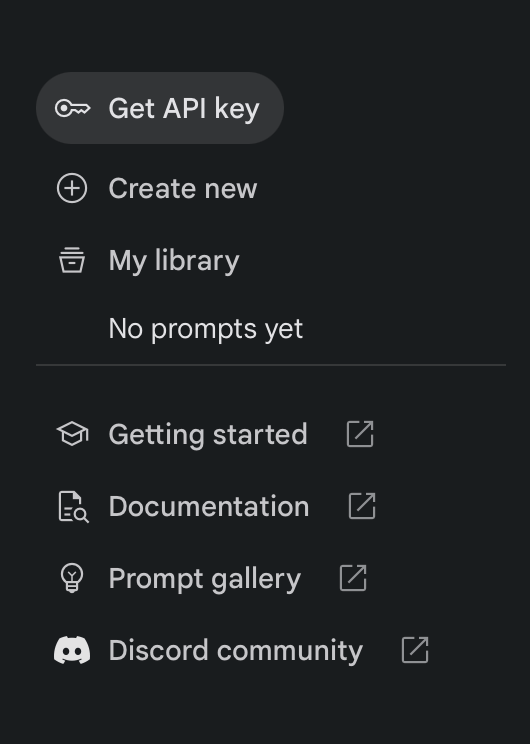
You will be redirected to the page where you can create API keys in your existing project or in a completely new project.
Click on the Create API key in new project.

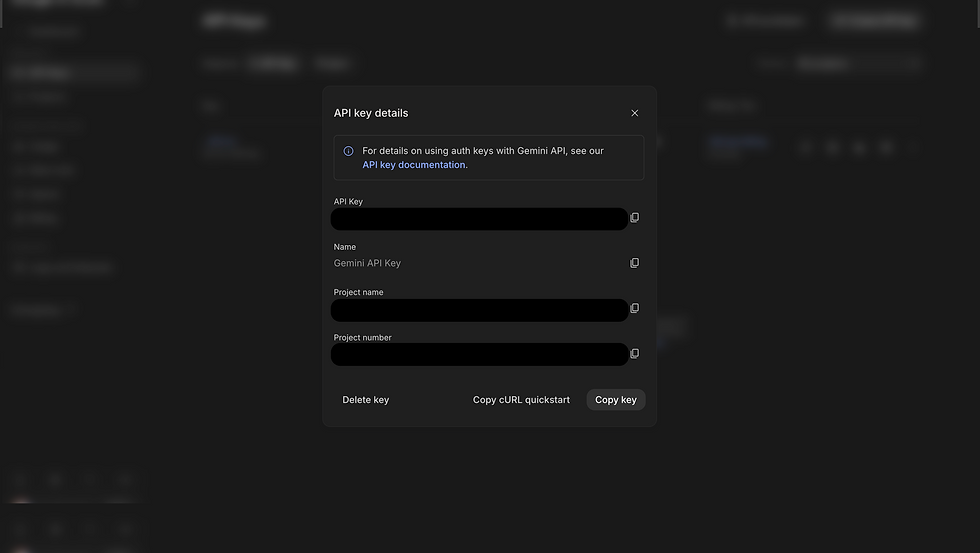
All done! Your API key is created successfully. Now you can use this key to use the Gemini Pro model.
Note:- Use your API keys securely. Do not share them or embed them in code the public can view.
curl "https://generativelanguage.googleapis.com/v1beta/models/gemini-pro:generateContent" \
  -H 'Content-Type: application/json' \
  -H 'X-goog-api-key: YOUR_API_KEY' \
  -X POST \
  -d '{
    "contents": [
      {
        "parts": [
          {
            "text": "Write a story about a magic backpack"
          }
        ]
      }
    ]
  }'
Change text with your prompt and key with the API key that you just created using Google AI Studio.
You can test your API key by running the above curl request in your terminal.
Using Gemini API keys: https://aistudio.google.com/docs/api-key
You can also use Gemini Pro in Google Vertex AI Studio. Do let me know if you need a blog or YouTube video on how to get started with Gemini Pro.
If you liked the above you may also like the below article, give it a read and let me know your thoughts.
Explore Google Vertex AI