How to Add an Ads.txt File in Wix for AdSense Verification
- Chandan Rajpurohit

- Mar 16
- 1 min read
What is Ads.txt?
ads.txt stands for Authorized Digital Sellers. It’s a simple text file placed on a website’s root domain that tells advertisers which companies are allowed to sell that site’s advertising inventory.
How ads.txt works?
A website owner uploads a file called ads.txt to the root of their domain.
Example:
https://example.com/ads.txt
The file lists authorized ad networks or exchanges allowed to sell the site's ads.
Advertisers and DSPs check this file before buying ad space to verify that the seller is legitimate.
Let's see how to add ads.txt to Wix site.
Go to Wix Settings -> Marketing Integrations
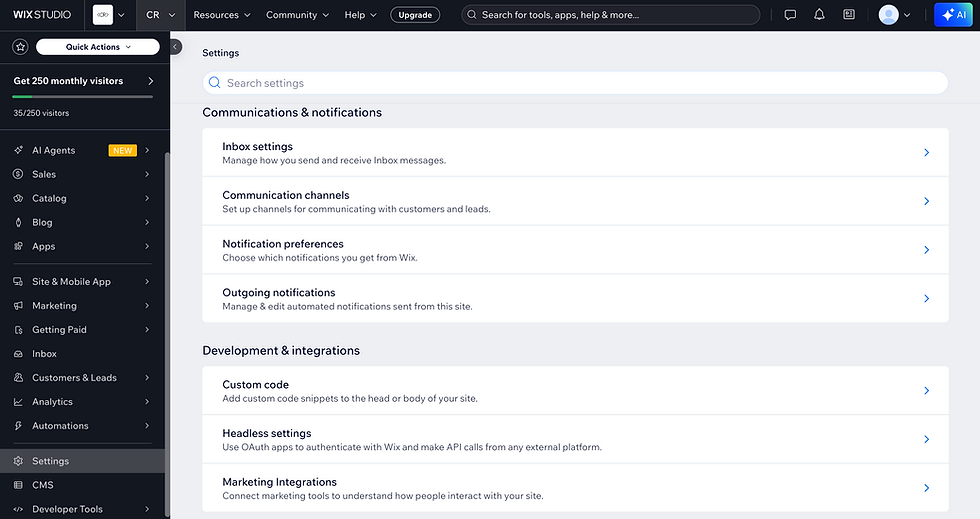
In Marketing Integration, go to Ads.txt integration and Connect

If Ads.txt is not create follow https://support.google.com/adsense/answer/12171612 to create an ads.txt file

Your ads.txt file should appear like this, where pub-0000000000000000 is your own publisher ID:
google.com, pub-0000000000000000, DIRECT, f08c47fec0942fa0Replace pub-0000000000000000 with your publisher ID and Save.

Congratulation 👏🏻 ads.txt is successfully added to your Wix site. To verify go to https://yoursite/ads.txt.
Thank you for reading this article, I really appreciate it. If you have any questions feel free to leave a comment.
Comments