From Code to Container: Understanding Docker and Containerization

You’ve probably experienced this at some point. The application works perfectly on your laptop. The code runs, the tests pass, everything looks good and then someone deploys it to another machine and suddenly something breaks.
Maybe the right version of Python isn’t installed. Maybe a package is missing. Maybe the operating system behaves differently. Or perhaps the application depends on a configuration that nobody remembered to document.
This is one of the problems Docker was built to solve.
Docker gives developers a way to package an application together with the dependencies and configuration it needs, creating a portable unit called a container. Instead of asking, “Does this application work on this machine?”, teams can create a consistent environment in which the application is expected to run.
But Docker is more than a tool for packaging applications.
It has changed how developers build, test, deploy, scale, and maintain software. It has also become an important building block for modern cloud-native development, DevOps, microservices, and CI/CD workflows.
Today, we’ll start with the basics and gradually explore how Docker works, why containers matter, the difference between containers and virtual machines, common Docker concepts, practical examples, and where Docker fits into modern software development.
Table of Contents
What Is Docker?
Docker is a platform for developing, packaging, shipping, and running applications using containers.
At its simplest, Docker lets you take an application and package it with the things it needs to run such as libraries, runtime dependencies, system tools, and configuration into a standardized image.
That image can then be used to create a container.
For example, imagine you have a Python application.
Your application might require:
Python 3.14
Django
PostgreSQL client libraries
Several Python packages
Environment variables
Specific system libraries
On your development machine, all of these dependencies may already be installed.
But another developer might have Python 3.10. A staging server might have Python 3.11. A production server could have a different Linux distribution altogether.
Docker allows you to describe the environment your application needs and package it into a repeatable image.
The goal is simple: make software environments more predictable.
What Is Containerization?
Containerization is the practice of packaging an application and its dependencies into an isolated environment called a container.
The idea isn't entirely new. Operating systems have supported different forms of process isolation for years. What Docker did was make container-based application development much easier and more accessible.
A container shares the host operating system's kernel but provides an isolated environment for the application and its processes.
That means you can run multiple containers on the same machine without giving each application an entire virtual machine.
For developers, this can make a huge difference.
Instead of writing a long setup document that says:
Install this runtime. Then install this package. Then configure this service. Then change this environment variable. Then make sure you're using this version...
you can often provide a Dockerfile and let Docker create the environment consistently.
Why Did Docker Become So Popular?
Before containers became common, software deployment often involved a frustrating amount of environment management.
A development team might build an application on one operating system, test it on another, and deploy it to a server with yet another configuration.
This created a familiar problem:
“It works on my machine.”
Docker doesn't magically eliminate every deployment problem, but it addresses a major source of inconsistency: differences between application environments.
Containers can provide consistency across:
Developer laptops
Testing environments
CI/CD pipelines
Staging servers
Cloud infrastructure
Production systems
This makes Docker particularly useful when multiple people and environments are involved in delivering the same application.
Docker Image vs. Docker Container
Two Docker terms often confuse beginners: image and container.
They're related, but they're not the same thing.
What is a Docker Image?
A Docker image is a packaged, read-only template used to create containers.
It contains things such as:
Application code
Runtime
Libraries
Dependencies
Environment configuration
Files needed by the application
You can think of an image as a blueprint.
For example:
Python application image
├── Python runtime
├── Application code
├── Python dependencies
├── Configuration files
└── Startup command
The image itself isn't the running application.
What is a Docker Container?
A container is a running or stopped instance created from an image.
If an image is the blueprint, a container is one instance built from that blueprint.
You can create multiple containers from the same image:

Each container can have its own process, network configuration, filesystem changes, and environment variables while using the same underlying image.
How Does Docker Work?
At a high level, Docker uses several components that work together.
The most important concepts are:
Docker client
Docker daemon
Docker images
Docker containers
Docker registries
Let's look at each one.
Docker Client
The Docker client is the interface you use to interact with Docker.
For example:
docker build
docker run
docker pull
docker push
docker ps
When you run a Docker command, the client communicates with the Docker engine to perform the requested operation.
Docker Engine
The Docker Engine is the technology responsible for building and running containers.
It manages things such as:
Images
Containers
Networks
Storage
Container processes
From a developer's perspective, you typically interact with it through the Docker CLI or other interfaces.
Docker Registry
A registry stores Docker images. A common example is Docker Hub, but organizations can also use private registries.
A typical workflow looks like:

This is one reason containers work well in distributed development environments.
What Is a Dockerfile?
A Dockerfile is a text file containing instructions for building a Docker image.
Here's a simple example for a Python application:
# This defines the base image.
FROM python:3.12-slim

# This sets the working directory inside the image.
WORKDIR /app

# This copies the dependency file into the image.
COPY requirements.txt .

# This executes a command while the image is being built.
RUN pip install --no-cache-dir -r requirements.txt

# This copies the application files.
COPY . .

# This documents the port the application is expected to use.
EXPOSE 8000

# This defines the default command that runs when a container starts.
CMD ["python", "app.py"]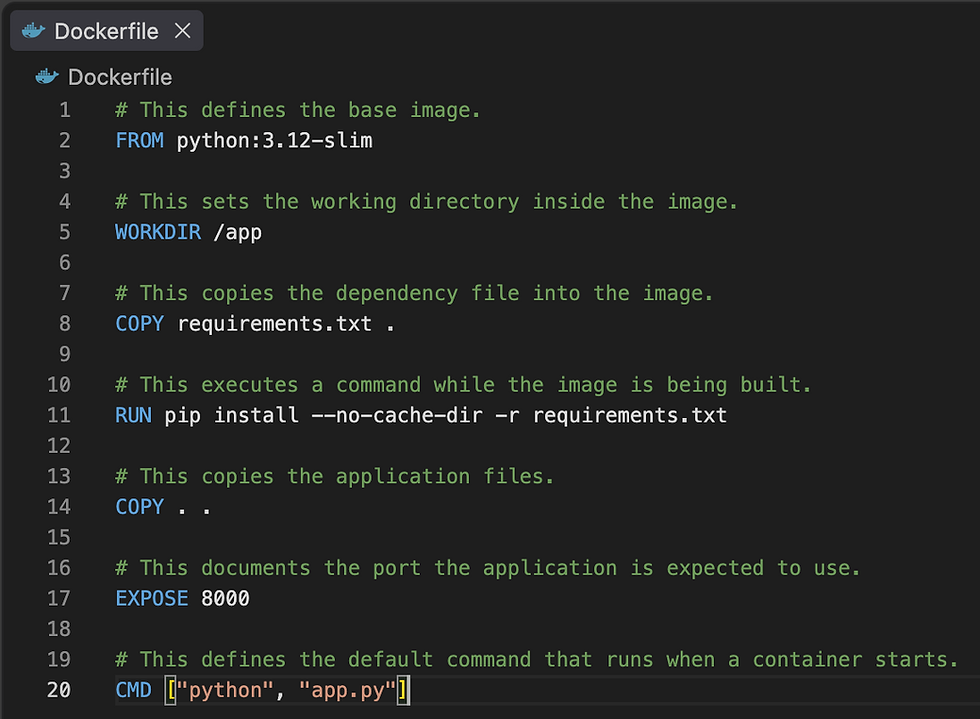
At first glance, it might look like a simple configuration file. But it describes how the application environment should be constructed.
Building Your First Docker Image
Once you have a Dockerfile, you can build an image with:
docker build -t python-app .Here:
docker build tells Docker to build an image.
-t python-app gives the image a name.
. tells Docker to use the current directory as the build context.
After the build completes, you can see your images with:
docker imagesYou should see something similar to:

Running a Docker Container
Now you can create a container from the image:
docker run python-appIf your application needs to be accessed through a port, you might use:
docker run -p 8000:8000 python-appThe first 8000 represents the host port.
The second 8000 represents the container port.
This allows traffic arriving at the host's port 8000 to reach the application listening on port 8000 inside the container.
Why Containers Are Lightweight
One of the biggest advantages of containers is that they generally don't require a complete guest operating system for every application.
A traditional virtual machine typically contains:
Application
Libraries
Guest OS
Virtual hardware
Host OS
Physical hardware
A container typically looks more like:
Application
Libraries
Container
Container runtime
Host OS
Physical hardware
Because containers share the host kernel, they can generally start faster and consume fewer resources than full virtual machines.
However, “lightweight” does not mean “free.”
Containers still consume CPU, memory, storage, and network resources. Running thousands of containers still requires careful infrastructure planning.
Docker Containers vs. Virtual Machines
Containers and virtual machines solve overlapping but different problems.
A virtual machine emulates a complete computer environment, including a guest operating system.
A container isolates application processes while sharing the host operating system kernel.
Here's a simplified comparison:
Feature | Containers | Virtual Machines |
Operating system | Share host kernel | Each VM has a guest OS |
Startup | Usually fast | Usually slower |
Resource overhead | Generally lower | Generally higher |
Isolation | Process-level isolation | Stronger system-level isolation |
Density | Often high | Generally lower |
Use cases | Application packaging, microservices, CI/CD | Full OS environments, legacy workloads, strong isolation |
This doesn't mean containers are universally “better” than virtual machines.
Many production environments use both. The virtual machine provides the infrastructure boundary, while containers provide application-level packaging and isolation.
Docker Networking
Applications rarely live alone.
A web application may need to communicate with:
A database
A cache
A message queue
An API
Another service
Docker provides networking features that allow containers to communicate with each other and with external systems.
For example:

Instead of hardcoding IP addresses, Docker networks can allow services to discover each other using container or service names.
This becomes particularly useful when building multi-container applications.
Docker Volumes and Persistent Data
Containers are designed to be replaceable.
That's useful for application processes, but it creates an important question:
What happens to data?
Suppose a PostgreSQL container stores your database inside its container filesystem. If you remove the container, you don't want your production database to disappear with it.
This is where Docker volumes come in.
A volume provides persistent storage that exists independently from the lifecycle of an individual container.
This distinction is fundamental to containerized systems:
Containers can be disposable; important data usually shouldn't be.
Common Docker Commands
If you're beginning with Docker, these commands are worth knowing.
Check Docker version
docker --versionList running containers
docker psList all containers
docker ps -aDownload an image
docker pull nginxRun a container
docker run nginxRun a container in the background
docker run -d nginxStop a container
docker stop <container>Remove a container
docker rm <container>List images
docker imagesRemove an image
docker rmi <image>View container logs
docker logs <container>Open a shell inside a running container
docker exec -it <container> shThese commands cover a large portion of everyday Docker usage.
Docker Image Layers
Docker images are built in layers.
Each instruction can contribute to the resulting image's filesystem layers.
This layered approach allows Docker to reuse previously built layers when possible. That matters because rebuilding an image doesn't necessarily mean rebuilding everything from scratch.
Suppose your application code changes but your dependencies haven't. Docker may be able to reuse the dependency-related layers and only rebuild the layers affected by the change.
This is one reason Dockerfile instruction order can affect build performance.
Docker Security: What Developers Should Know
Containerization introduces useful isolation, but a container should not be treated as an impenetrable security boundary.
Docker security involves several layers.
Use Trusted Base Images
Your base image becomes part of your application environment. Choose images carefully and keep them maintained.
Avoid Running as Root
Where practical, configure applications to run as a non-root user inside the container.
For example:
RUN useradd --create-home appuser

USER appuser
The exact approach depends on the application and base image.
Keep Images Small
Smaller images generally contain fewer components, which can reduce attack surface and make distribution faster.
This is one reason lightweight base images are popular.
Don't Put Secrets in Images
Avoid embedding passwords, API keys, and other sensitive credentials directly in Dockerfiles or images.
For example, don't do this:
ENV DATABASE_PASSWORD=secret-passwordInstead, use an appropriate secret or environment-management mechanism for your deployment environment.
Scan Images
Organizations can use container image scanning tools to identify known vulnerabilities in dependencies and base images.
Security should be part of the container lifecycle rather than something added after deployment.
Common Docker Mistakes Beginners Make
Docker makes many things easier, but it has its own learning curve.
Treating Containers Like Virtual Machines
A container is generally designed to run a process or application, not to behave like a traditional server with a full operating system environment.
Storing Important Data Inside Containers
Containers can be replaced.
Important persistent data should normally be stored using an appropriate persistent storage mechanism.
Putting Everything Into One Container
You can technically put many processes into a single container, but containerized architectures often work better when application responsibilities are clearly separated.
That doesn't mean “one container per tiny function” is always correct either. Architecture should follow actual application needs.
Using Huge Base Images
A large image can make builds and deployments slower and increase the number of components that need maintenance.
Ignoring .dockerignore
A .dockerignore file can prevent unnecessary files from being sent as part of the build context.
For example:
.git
node_modules
.env
__pycache__
*.log
The exact entries depend on your project.
When Should You Use Docker?
Docker can be particularly useful when:
Your application has multiple dependencies.
Developers need consistent environments.
You want reproducible builds.
You run CI/CD pipelines.
You deploy applications across multiple environments.
You are building or operating microservices.
Your application depends on supporting services such as databases or caches.
You want an easy way to package an application for deployment.
For a tiny script that runs once on your laptop, Docker may add unnecessary complexity.
That's an important point: Docker is a tool, not a requirement.
Use it when the benefits of reproducibility, isolation, packaging, and deployment consistency outweigh the additional complexity.
The Bigger Picture: Docker and Cloud-Native Development
Docker helped popularize containers, but modern container infrastructure goes well beyond Docker itself.
In larger environments, organizations may use container orchestration platforms such as Kubernetes to manage:
Container scheduling
Service discovery
Scaling
Health checks
Rolling deployments
Networking
Configuration
Workload management
This leads to an important distinction.
Docker is a container platform and developer toolset. Kubernetes is a container orchestration platform.
They can work together, but they solve different problems.
A developer might use Docker to build an image and then deploy that image into a Kubernetes-managed environment.
Is Docker the Same as Containerization?
No.
Containerization is the broader concept.
Docker is one of the technologies that makes containerization accessible and practical for developers.
Think of it this way:
Containerization = the approach
Docker = a platform/toolset used to implement that approach
There are other container technologies and runtimes in the broader ecosystem as well.
Understanding this distinction helps prevent a common misconception: containers aren't synonymous with Docker.
Docker changed the way many developers think about application deployment.
Instead of treating software as just source code, Docker encourages us to think about the entire environment required to run that software.
The real value isn't simply that you can type docker run.
The value is that you can take an application, describe the environment it needs, package that environment consistently, and move it from a developer's laptop toward testing and production with far fewer environmental surprises.
That is the fundamental idea behind Docker and containerization and it's a useful foundation for understanding modern application development and cloud infrastructure.
Frequently Asked Questions (FAQs)
What is Docker in simple terms?
Docker is a platform that allows you to package an application and its dependencies into a containerized environment so the application can run more consistently across different systems.
What is a Docker container?
A Docker container is an isolated runtime environment created from a Docker image. It contains the application and the filesystem components it needs while sharing the host system's kernel.
What is a Docker image?
A Docker image is a packaged, read-only template used to create containers. It contains the application, dependencies, and instructions needed to run it.
Is Docker a virtual machine?
No. Docker containers and virtual machines use different approaches. Containers generally share the host operating system kernel, while virtual machines run their own guest operating systems.
Why do developers use Docker?
Developers use Docker for environment consistency, application packaging, reproducible builds, testing, local development, CI/CD, and deployment.
Is Docker difficult to learn?
The basic commands can be learned relatively quickly. The deeper concepts networking, volumes, image optimization, security, orchestration, and production operations take more time.
Can Docker run a database?
Yes. Databases can run in containers, and this is common for development and some production scenarios. Persistent storage, backups, security, and operational requirements need to be considered carefully.
Is Docker necessary for every application?
No. Docker is useful when its benefits solve real problems in your development or deployment workflow. Small or simple applications may not need it.
